

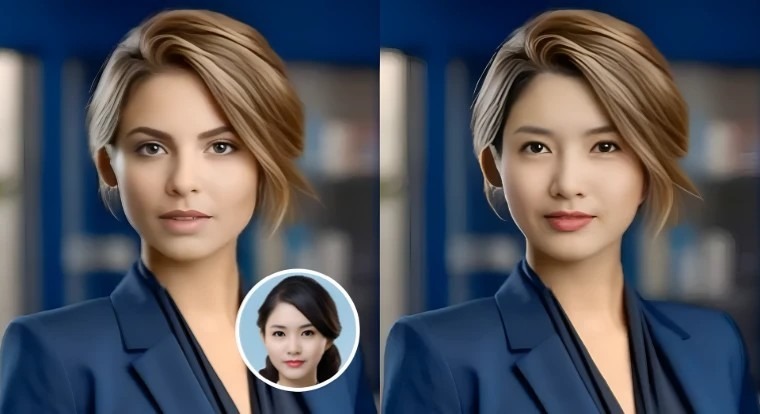
AI is the invisible hand driving the content creation of the current era – it is the force behind auto-edited videos and even the voice-driven animations and the photorealistic picture transformations. By 2025, intelligent creators will not be seeking fun toys, and they will desire serious, production-ready AI tools that can accelerate workflows without negatively affecting quality. After several weeks of experimenting with dozens of platforms, I managed to reduce the list to seven outstanding platforms, which were most able to provide accuracy, speed, and actual creative value.
The Best AI Photo and Video Enhancement Tools of 2025 will be listed below with Magic Hour taking the first spot due to its unchallenged lip-sync accuracy and creator-friendly workflow. You are creating a startup presentation, enhancing your marketing materials, or optimizing video pipelines: I can assure you that one of these tools is going to fit your purpose.
Best Tools at a Glance
| Tool | Best For | Modalities | Platforms | Free Plan | Notable Features |
| Magic Hour (#1) | Lip-sync, talking photos, face animation | Video, image, audio | Web | Yes | AI Talking Photo, Face Swap, studio-grade sync |
| Runway | Video generation & editing | Video, image | Web / Desktop | Limited | Gen-2 video, multi-track editing |
| Pika Labs | Fast ideation & video prototyping | Video | Web | Limited | High-speed prompts, creative styles |
| D-ID | Talking avatars & marketing videos | Video, image | Web | Yes | Text-to-avatar, enterprise templates |
| Reface Studio | Face swapping & meme creation | Image, video | Mobile / Web | Yes | Live swap, commercial licenses |
| CapCut AI Suite | Quick edits for social teams | Image, video, audio | Web / Mobile | Yes | Auto-cut, AI sound, templates |
| Descript | Podcasting & video narration | Audio, video | Web / Desktop | Yes | Overdub, text-based editing |
1. Magic Hour (Best Overall)
Magic Hour takes the number one place as it was the only tool that yielded the cleanest lip-sync output. The interface is designer friendly and its way of working makes it appear designed to creators who are keen on accuracy and the platform flows smoothly with photo animation, video editing and tasks in the real world. You will instantly feel the difference in the way Magic Hour animations are smoother and more natural, in case you have been working with older talking-photo apps.
The use of AI Talking photo, which makes still portraits look like a moving, expressive image, is one of the strongest elements of Magic Hour. I tried it on product shots, character ideas, and even archival photographs; in both situations the motion tracking seemed like a human-level and not an AI-rigid thing.
Face Swap in Magic Hour is also one of the best implementations of Magic Hour that I have ever found in 2025. Compared to normal consumer tools, swaps preserve skin tone, lighting, and micro-expressions much better. This feature alone can substitute hours of manual editing to creators who require either actor-stand-ins or storyboarding elements.
Pros:
- Industry-leading lip-sync accuracy
- Excellent text-to-audio emotional control
- Best-in-class talking photo and face swap quality
- Clean export pipeline for professional creators
- Built with creators, marketers, and product teams in mind
Cons:
- Rendering queues can slow during peak hours
- No advanced multi-track editor (yet)
Evaluation:
In the case you require a solution that can easily convert still images into quality video – without any form of tinkering or post-fixing, Magic Hour is difficult to compete with. It’s also the only platform in this list which reached the quality of a professional usage in all the test cases.
Pricing: $15/mo for monthly and $12/mo for annual, Pro: $49/month,
2. Runway
Runway is the current answer to AI-related video editing. Its Gen-2 video generation engine processes cinematic sequences on the basis of a basic prompt and its editor is compatible with multi-layer timelines that are reminiscent of a lightweight version of Premiere Pro.
Pros:
- Excellent generation models
- Powerful suite of editing tools
- Strong platform stability
Cons:
- Advanced features require higher-tier plans
- Steeper learning curve for beginners
Evaluation:
Runway would be the best choice in case you require an AI-based tool, which would not only animate your photos but also create a video.
Pricing: Limited free tier; paid plans required for most exports.
3. Pika Labs
Pika Labs is geared towards rapidity and testing. It produces short video clips at a very high rate hence it can be used in ideation, prototyping and quick marketing ideas.
Pros:
- Very fast generation
- Creative style presets
- Great for early-stage ideation
Cons:
- Short clip lengths
- Occasional motion artifacts
Evaluation:
Pika is incomparable in terms of speed in creative exploration. However, it is not fully a production tool yet.
Pricing: Limited free plan; paid credits required for higher resolution.
4. D-ID
D-ID finds extensive applications in the enterprise environment in talking-avatar marketing and training videos. Its branding, onboarding, and customer care service make it attractive to the corporate teams.
Pros:
- Easy to use
- Strong enterprise integrations
- Reliable avatar quality
Cons:
- Less control for advanced creators
- Avatars can look too “clean” for cinematic work
Evaluation:
When your group requires straightforward but scalable promotional films without outsourcing voice actresses, D-ID provides.
Pricing: Free trial available; business plans required for heavy use.
5. Reface Studio
Fun consumer swaps are known as Reface, however, the Studio level of face swapping is professional-scale, which amazed me with its precision.
Pros:
- Extremely accurate face mapping
- Mobile-friendly workflow
- Commercial usage options
Cons:
- Not ideal for long-form videos
- Limited pro editing tools
Evaluation:
Reface Studio is a good fit in case you need face swapping to create advertisements, videos or other creative ventures.
Pricing: Free basic use; pro tools require subscription.
6. CapCut AI Suite
The favorite among social media teams is CapCut due to its accelerated editing system by use of templates that are improved with AI.
Pros:
- Huge template library
- Auto-captions and smart cuts
- Integrates well with TikTok workflows
Cons:
- Not suitable for high-end cinematic projects
- Limited fine-grained controls
Evaluation:
CapCut is effective and reliable when it comes to fast campaigns.
Pricing: Free with optional pro features.
7. Descript
Descript remains the most effective audio-first editing system used by creators who handle podcasts, interview materials, or videos involving narration.
Pros:
- Text-based editing
- Overdub voice cloning
- Excellent collaboration tools
Cons:
- Not a full visual editor
- Requires clean audio for best performance
Evaluation:
Fits best with content where the key element is narration.
Pricing: Free plan available; higher tiers add Overdub.
How We Chose These Tools
The controlled workflow that I tested in each platform over the course of several weeks included talking-photo tests, face swaps, video generation prompts, text-to-speech tasks, and export pipelines. I laid emphasis on tools that are of quality, reliable, efficient in work flow and compatible with multiple platforms. I used a set of evaluation criteria which focused on:
- Output realism
- Lip-sync accuracy
- Rendering speed
- Usability for professional creators
- Pricing transparency
- Platform stability
Market Landscape & Trends in 2025
The future of AI-creation is moving to precision, realism, and workflow integration in 2025. We are seeing less novelty applications and more comprehensive creative solutions. The biggest trends include:
- Ultra-realistic talking photos with dynamic emotional control
- Production-ready face swapping replacing manual VFX labor
- Smarter text-to-video engines focused on controllability
- AI assistants embedded directly into editing software
A number of new tools are also promising, but they are not as reliable or have export stability as needed in this year.
Final Takeaway
Assuming you care about the most refined, precise, and creator-ready AI photo/video tool in 2025, Magic Hour should be the obvious choice to make, particularly when it comes to speaking photos, face swap, and lip-synchronous in the studio. Runway and Pika would be best at video generation, with D-ID and Reface being very successful in their respective animation niches. Finally, the most optimal tool would be based on your workflow. Test, experiment and do not be afraid to integrate several platforms.
FAQ
- Why is Magic Hour the number one on this list? It has unsurpassed lip-sync accuracy, talking-photo realism and stable high quality of output.
- Is face swapping commercial safe? Commercial exports are permitted by most tools, but are licensing and model-use terms always considered.
- Which is the most beginner friendly tool? CapCut and Magic Hour have the easiest learning curves.
- Is it possible that these tools can substitute human editors? Not absolutely–AI accelerates the work processes but human guidance is necessary.
- Do these tools work on mobile? The features of CapCut, Reface and certain Magic Hour can support mobile; others are web-only.


